Posts

Showing posts with the label Apache

Install and configure Jenkins on Ubuntu 16.04

Image
Introduction Jenkins  is an automation server written in Java, as a fork of the  Hudson  project. It helps to automate part of the software development process, with aids like continuous integration, but also by further empowering teams to implement the technical part of a Continuous Delivery.  Jenkins  supports many SCM (Source Control Management) software systems including  Git ,  SVN , and  Mercurial  and provides hundreds of plugins to automate projects. This tutorial explains how to install and use Jenkins on Ubuntu 16.04 using Apache as server . Install Java Jenkins  requires Java, so, install  OpenJDK7  on the server. First, install  python-software-properties : # apt install python-software-properties Then you can add Java repository: # add-apt-repository ppa:openjdk-r/ppa Update Ubuntu repos and install OpenJDK: # apt update # apt install openjdk-7-jdk Run  $ java -version  to verify th...

Encrypt your Apache Web Server on CentOS 7

Image
Introduction It was September when, with a  post on its blog , Google announced that starting from Chrome 56, its browser will mark non-secure pages containing password and credit card input fields as  Not Secure  in the URL bar. It’s important to note that we are talking about  all HTTP pages  collecting users’ “critical” data. This move is part of a long-term plan to mark all HTTP sites as non-secure. So, if you own (or manage) a web server, you need to make the right move:this article this will explain just what that means. Why HTTPS? The first question is: why is Google doing this? What are the concerns around HTTP, and why, today, is it a good choice to secure connections? Of course, everybody knows that secure is better then insecure; but in this case, the big problem with HTTP is that it lacks a system for protecting communications between clients and servers. This exposes data to different kinds of attacks, for instance, th...

Build a LAMP stack (Linux, Apache, MySQL, PHP) - CentOS 7

Image
To build a dynamic web application, you need what has been coined a “stack” - which is developer lingo for an integrated set of software that has all of the components your application needs. Most stacks have the same types of components and differ mainly in which pieces of software they use for those components. For example, we’ll look at LAMP (which this article covers): LAMP Software: Linux (e.g. CentOS), Apache, MySQL, PHP If you're astute, maybe you noticed that LAMP is just an acronym for the software the stack uses. In this guide, we'll walk you through installing all of these components (except for Linux, which is already installed as your OS when you create the server). Install Apache Before you begin any installation, make sure that your software is up to date: # sudo yum update Install Apache: # sudo yum install httpd Start Apache: # sudo systemctl start httpd.service Set Apache to start on server b...

SSL Certificates with Apache on CentOS 7

This guide will show you how to enable SSL to secure websites served through Apache on CentOS or Fedora. Before You Begin This guide assumes that you are running Apache2 on CentOS or Fedora. Prior to starting this guide, ensure that the following steps have been taken on your Linode: Familiarize yourself with our Getting Started guide and complete the steps for setting your hostname and timezone. In order to configure your Apache server to function with SSL, you will need to ensure that the Apache mod_ssl module is installed on your system. You can do so by running the following command:           # yum install mod_ss Configure Apache to use the SSL Certificate Edit the virtual host entries in the /etc/httpd/conf.d/ssl.conf file to include the certificate files and virtual host information that should be used by each domain. For each virtual host, replicate the configuration shown below. Replace each mention of example.com with ...

How to Install Apache on CentOS 7

Image
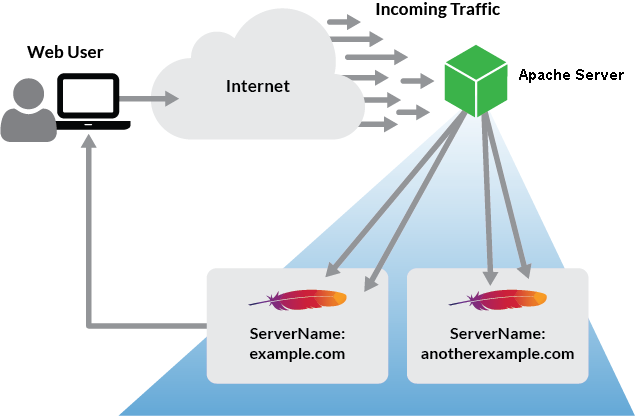
Apache is an open-source web server that can be configured to serve a single or multiple websites using the same Linode. This guide explains how to install and configure the Apache web server on CentOS 7. This guide is written for a root user. Replace each instance of example.com in this guide with your site’s domain name.  Before You Begin Ensure that you have followed the Getting Started and Securing Your Server guides, and the hostname is set. To check your hostname run: # hostname # hostname -f The first command should show your short hostname, and the second should show your Fully Qualified Domain Name (FQDN). Update your system: # sudo su - # yum update Install and Configure Apache # yum install httpd Modify httpd.conf with your document root directory to point Apache to your site’s files. Add the <IfModule prefork.c> section below to adjust the resource use settings. The settings shown below are a good starting point for a 2GB: Before c...

HTTP to HTTPS

Scenario : You want to force people coming to your site to use HTTPS. Either for the entire site or a small sub-section of it. Note:  Using mod_rewrite to do this isn't the recommended behavior. See RedirectSSL Fix : RewriteEngine On # This will enable the Rewrite capabilities RewriteCond %{HTTPS} !=on # This checks to make sure the connection is not already HTTPS RewriteRule ^/?(.*) https://%{SERVER_NAME}/$1 [R,L] # This rule will redirect users from their original location, to the same location but using HTTPS. # i.e. http://www.example.com/foo/ to https://www.example.com/foo/ # The leading slash is made optional so that this will work either in httpd.conf # or .htaccess context Entire site (.htaccess) : Note: While the rules you need are the same as above (because the rule above doesn't depend on any of the quirks of rewrite in .htaccess), you will need to ensure that you place this in a .htaccess file in the root of the site you want to apply ...